
i got sick of dualbooting windows

taking into consideration this, i decided to pull out my old rx 570 and put it back into my computer to make myself a virtual machine with my current graphics card passed through into it. so far it’s been a good experience so why not talk about it here.

after putting the computer back together i started it up and noticed that for some reason the bios screen is all white on the card i’m using for linux. weird, but waiting a few seconds results in linux booting normally (apart from what seemed to be a stack trace appearing that i fixed later on) so i take no notice. once the computer booted i had a look for guides and came across this guide from github user bryansteiner which covers installing the necessary software, setting up hooks to automatically pass through any devices you’d want to use and add them back to your host once you’re done with the vm, making the vm itself, and some performance enhancements. i followed this and not long after saw the tianocore boot logo on the display i plugged into the vm’s gpu. after installing windows i noticed that the graphics card claimed to have failed to properly start, with the error code 43 showing up in device manager. i turn the vm off to troubleshoot and end up learning something fun about radeon graphics cards.

turns out there exists a known, years old, still unfixed bug named the AMD/Radeon Reset Bug where from what i understand, after powering off or restarting a VM the card is put in a state where its unable to come back up until you reboot your host. and to make things even better if you try to reboot your host in this state it’ll hang and you’ll have to force it off. this naturally diverted my attention a bit and led me to try out this fork of a kernel module named vendor-reset which claims to be able to fix this bug for the family of graphics cards mine belongs to. unfortunately it didn’t seem to function on my setup so after re-evaluating whether or not i *really* needed the gpu to be accessible on my host i decided that it would have been more of a nice-to-have than something that would stop me from doing anything i’d want to do on the host so i ended up just giving vfio-pci full access to the card later on.

but until that happened i was still in hell and still wanted to find the solution to why windows didn’t want to start my graphics card. after some searching i found posts online that claimed that having Resizable BAR enabled in your BIOS can cause this issue. i disable it however and my computer was unable to start the display manager (or looking back at it maybe it was attempting to start it on the other GPU as at this point i hadn’t actually given vfio-pci the card, that’d come later). since it clearly wanted me to re-enable ReBAR i did and came across this page which contained the information i needed to sort this out.

so to explain what the bloody hell’s going on i’ll attach this picture here:

you don’t really need to know what any of this output means (i don’t even know myself really right now lol, my last motherboard was for a 13 year old processor. said processor is also currently where my computer gets its hostname, hence why its set to what it is. the haswell i7 unfortunately did not have ReBAR support), but i would like to bring your attention to the bottom line of that output, BAR 2. by default, my machine under Linux sets BAR 2 to its maximum supported size of 256MB. turns out windows doesn’t like that. it can’t handle that being set to anything above 8MB. so i temporarily change the BAR 2 size and boot the VM up, which did indeed fix that issue.

now that i’m able to see graphics at a resolution that exists i thought i might as well fix the reset bug so that i don’t have to reboot my host every time i reboot the vm. as discussed earlier my fix for it personally was to just give vfio-pci access to the card all of the time. so while figuring out how that all worked i came across this repo from github user clayfreeman which also goes in-depth on how to make a virtual machine with a gpu passed through into it. i used all the steps in the “Blacklisting the GPU” part to do exactly as the name suggests. after rebooting i noticed that the stack trace i went on about earlier disappeared, then with my newfound knowledge decided to blacklist the M.2 NVMe SSD i’m using as a boot drive for the VM so that i never have to see it again on my linux machine. doing that meant that i had to get rid of the scripts in the libvirt hooks folder for binding the GPU to vfio-pci and back to amdgpu once i’m done with the VM so while doing that i set up a script that unbinds the card from vfio-pci so it can resize the BAR, resizes BAR 2, then rebinds it to vfio-pci before starting the VM so i don’t have to do it manually every time i reboot the host.

with the vm now functioning i decide to go through the setup for Looking Glass which was a fairly easy experience. compiled a lot easier than a lot of other softwares i’ve had to compile to use in the past. upon trying to actually use it though i just got a black screen on the viewer which i fixed by making the realisation that i compiled the latest version on the host and on the VM downloaded an older release candidate build. updating the VM’s software fixed that issue.

now for the question of kernel-level/invasive anti cheat softwares. my answer personally is to not even bother with evading their detections. i’m lucky in the sense that the only thing i actively use that’s “protected” by these kinds of malwares is VRChat. when they initially announced they were going to use easy anti-cheat in their software the platforms that people moved over to in protest were ChilloutVR and what was called Neos VR at the time, now known as Resonite. i picked Chillout mostly due to it’s familiarity coming from VRChat compared to Neos. i wouldn’t mind using this as a chance to go back. in fact i’ve already ported my avatar to Chillout and it works great.

speaking of anticheat i thought i’d discuss Roblox’s VM detection for a quick second, part because i use the platform a lot to play Dandy’s World (good game if you make the choice of not interacting with the developers’ Discord server, use a randomiser once you’ve got basically all the Toons and in my experience it makes the game really fun) and part because people are very very split online as to whether it works on a VM or not. i can add one to the list of people who have had success in running Roblox in a VM:
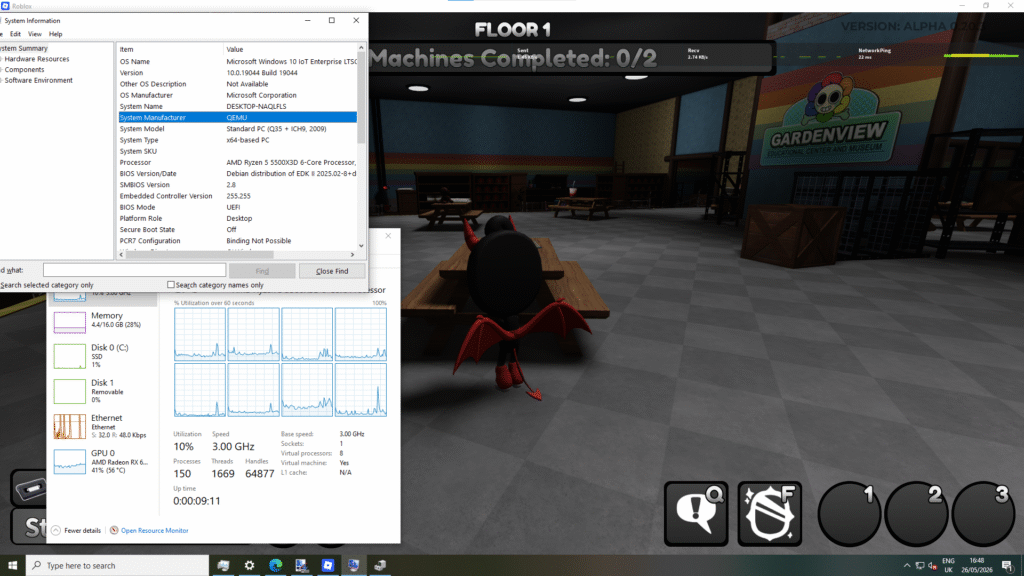
some things i would like to state though are that you do need a GPU passed through into it, it will error out if you don’t give it one, and i currently don’t understand why but now know from experience that for Roblox to run on a VM whose host runs an AMD CPU you also need to make sure to pass the ‘topoext’ feature which allows the VM to be aware of the fact that you have a processor capable of hyper-threading.

probably good practice to enable it either way though considering what it does.

edits

(2026-05-31: “it will error out if you don’t” is now “it will error out if you don’t give it one”)
(2026-05-31: replaced the phrase “QEMU hooks.d” with “libvirt hooks”)
(2026-05-31: updated images to enable enlarge on click)

the new server post, as promised

so to start this one off, i’ll provide some context (as per usual). one of my mates was spending a load of money per month on server hardware so that he could host websites and discord bots and game servers and such. he realised a while into it that it was costing him a lot so he wanted to cut back. his way of doing that was outright buying server hardware for us all to use. he found on ebay for himself a HP ProLiant ML350e Gen8 for ~£100 that he’s currently using for i believe backups and media serving, and generally just as a main while waiting for some more hardware. after that purchase, he let me know that he was willing to buy some hardware for me too.

after much searching, i found a HP ProLiant MicroServer Gen8 with a 2 TB hard drive pre-installed for ~£130. seemed good to me, the CPU needed upgrading because it was a small 2 core Celeron G1610T and I was planning to use the machine for virtualization, which also made it unfortunate that the RAM limit was 16GB but honestly definitely a limit i can work with. the machine made up for it with it’s built in iLO (Integrated Lights-Out) chip which if you’re not familiar with, would allow me to have complete remote control over the machine, even when it’s not powered on. helpful considering my unfortunate lack of working USB keyboards.

now with the server chosen, i moved on to finding a network switch. my criteria was very simple, gigabit with more than 4 ports. i have one ethernet cable carrying internet and i needed it to reach 4 devices. some expansion for the future would be nice too. i found a brand new sealed Netgear gigabit 8-port switch on sale for ~£20. nice, i’ll be taking that. for the RAM i found 16GB of the stuff it wanted (DDR3-1600 unbuffered ECC) for another ~£20 and i needed some thermal paste so that was another ~£5, as well as a couple cables to route power to an SSD i’ll be using as a boot drive, ~£4.

for the CPU, i had a good bit of choice. due to the Gen8 having a motherboard with a socket unlike the Gen7 systems which have soldered CPUs, there are a good few different chips that the system can take. people seem to recommend the Xeon E3-1265L V2 as the best all-around chip for this system. only 10W above the TDP limit of the cooler (35W), 4 cores with hyperthreading and a good base/boost clock combo for what it is. it can be hard to find sometimes and a little more expensive than its alternative though so failing that there’s the Xeon E3-1260L for a lower price with a couple hundred MHz lower clock. you wanna know what they don’t recommend? the Xeon E3-1240 V2. over double the TDP limit of the cooler at 69W and a boost clock speed that really does not make that increase worth it whatsoever. but i found one on ebay that i would soon learn had a dent in the IHS for only £9!

a few days later, i was exercising while i notice a van park up on our driveway. i greet the man in the van and he hands me a parcel. i thank him and open it in my room. inside it i found the server. it seemed a bit dusty but i thought nothing of it because it didn’t seem too bad. i continue exercising then once i’m done i get some stuff to clean the server out and hop into a voice channel with a friend. i then open the server up…

…oh my god its fucking disgusting. touching any part of the inside was absolutely horrible. it was clearly used in some sort of industrial hellhole or really really not taken care of or both. while disconnecting everything i thought the fan cable plug was meant to just pull out. turns out i was wrong. in my stupidity i believe i pulled the socket out of the board just a little bit. later on i realised that it hadn’t been pulled out enough to stop the fan from working thankfully. everything else went fine though, i slid the motherboard out (it’s screwed onto this really cool metal plate that you can just slide out of the case) and cleaned that up along with everything else in the case. after i felt like i wouldn’t cause dust to be sprayed all over my room upon booting the system up, i put it back together and booted it up into ShredOS to shred the drive (and some others i decided i wanted to fit into the system).

fast-forward to the arrival of everything but the CPU, i install the RAM and the SSD thanks to the molex splitter and molex to SATA cable i bought to tap into the PSU’s molex power, i connect everything up to the network switch and connect to the iLO. once i’m in i update it and the system’s BIOS (please don’t buy those ~£30 BIOS/iLO update packages on eBay, you can achieve the exact same thing for free by downloading the web installers for the BIOS/iLO on HP’s site then extracting the updates from those exe files using 7-zip) and then mess about with installing Debian onto the machine. the reason why i have to “mess about” instead of just installing Debian is because of a funny little thing with this machine’s BIOS. it allows you to boot from a drive connected to the motherboard’s SATA port (usually reserved for an optical drive) but as soon as you also plug a drive into one of the non-hotplug slots on the front it disables booting from that SATA port on the motherboard if you’re using the built in RAID controller for the backplane. now why it does this i have no fucking clue, but it means i have to store a bootloader on a different device that the bios can boot from when the backplane is in use. thankfully the motherboard has both a USB port and a microSD card slot that can be booted from, and i have a 1GB microSD card i can use for that. ultimately i decide on storing /boot on the SSD connected to said problem port so that i get fast speeds updating the kernel and other Linux boot files but also install a copy of GRUB onto a microSD card which i can use to chainload the GRUB install on the SSD.

now that Debian is installed, i secure the install and enable SSH so that i don’t have to continue using the really slow console on the iLO. after that i install Proxmox over the Debian install. i do it this way simply because there are no LUKS encryption options in the Proxmox installer. now that Proxmox is installed i whitelist the port and set that up. i download the ISOs i’d be needing (Debian 12, Windows 10 IoT Enterprise LTSC and the virtio drivers for Windows) and start to set up my VMs. soon i’ll make a page detailing all my VMs and what they do, but for this blog post i’ll talk about one in particular, which is the most important of the two “public facing” VMs on my system.

on this VM i installed a copy of Debian 12. it got secured the same way that the host machine did and after that i moved everything from my old VPS to it. now comes the fun part, how i got those public-facing services on the internet without needing a static IP address. some time between my childhood years having to use Hamachi to allow others to access services i set up and last month Cloudflare made this awesome piece of software called “cloudflared” that allows services on a machine to tunnel through their network to your domain, therefore not requiring a static IP of your own. i set that up using their dashboard and all i had to do (minus setting up certificates to give to the Apache web server) was run a one-line bash command to install the service, point the root of my website to the port commonly used by web servers for HTTPS traffic (443), then tell it to be happy with certificates made for my domain.

the CPU finally arrives. i take out the poor old Celeron, put this new chip in, repaste, clean the heatsink, and boot. it fails to boot. it’s stuck POSTing. i reboot. it’s stuck POSTing. this happens maybe once or twice more and then finally decides to complete its POST and boot. despite those POST issues, it’s completely stable once booted. i haven’t tried to benchmark or anything but i’ve not noticed any issues apart from the heat issues from running a 69W CPU at load on a 35W heatsink (which isn’t an issue anyway cause the server rarely sees load). after that first boot it seems a lot happier though, it might maybe fail once on a cold boot but apart from that it’s fine.

it’s now been a month and a half since i first got the server and the experiences i’ve had in that time have certainly made me more interested in self hosting, it’s only fueled my addiction to actually owning the stuff i use on a daily basis even more. you’ll likely see more posts here in the future regarding this sort of stuff if you decide to stick around with me. i’ve gotten back into VR as of recently too so talking about that could be fun. vive pro wireless post 6 years after its release, anyone??????

thanks for reading all this haha
happy halloween :D

working on a new Octoling

since the 3rd of October 2019, i’ve been working on a Discord bot called Octoling. it’s been really fun, hence why i’m still working on it every now and then almost five years later. so far the bot has a nice set of features but lacks many modern features such as / commands and the ability to add commands to your user profile to use wherever. to solve this, i have begun building a new version of the bot with the idea of keeping the code as futureproof as possible as the main focus. i’ll likely make posts here about the progress of this new code as i work on it.

been looking for github alternatives

i don’t really like microsoft that much believe it or not. i used to think they were cool as fuck, u know back when windows 7 was a thing, but not so much now. honestly i’ve had an okay experience with windows 10 most of the time, now that it’s been almost a decade since it’s launch failure, but there’s always been things about it that have kept me interested in the idea of staying far away from it these days. and now that windows 11 is a thing, that’s only interested me in staying away even more. i really don’t get what they’re trying to do now. ‘new, modern UIs’ that don’t make anything easier whatsoever, AI shoved into every corner of the OS, more bloat to make the thing even slower (apparently even on 1600 USD Intel Core i9 CPUs, if twitter is to be believed). all i want is a usable operating system, and i’m sure that’s all a lot of others want too.

but i’m getting beside the point. or am i? i mean they’re starting to shove all this crap down into the throat of github and everything else they touch too, hence why i’m even writing this now. all i wanna do is code in peace man, i really don’t care for github copilot or windows copilot or bing copilot or any copilot. i just want to be my own user. i have no need for any of this and it seems as if a lot of others don’t too. so as a result, i’ve been looking into alternatives to github. and i think i’ve finally found one that i like:

codeberg.

the first impressions are pretty damn good, hosted by a nonprofit outside the US, claims no tracking and when you load into it the first thing you see isn’t this:

i cannot begin to explain how much i don’t care about AI for my own code.

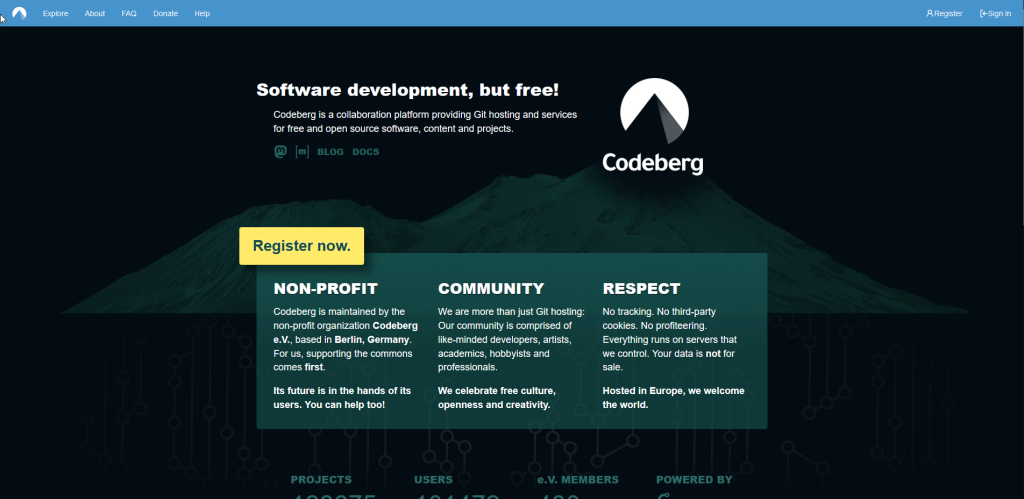
instead, what you see is this:

yeah they have the obligatory big ‘register now’ button but i don’t really blame them funnily enough

loads better in my opinion. not only does the page just look nicer to me, the contents of it are more about how they care about your data and not about how all they want to do is steal your data. how kind of them.

few days later (and a few months after originally making my account), i start using it. it is indeed safe to say that i love it. looks nice, runs nice, UI just works and it’s taught me how to use git too, so i can ditch even more microsoft software! next up, vs code. anyone know any good alternative IDEs?