
i got sick of dualbooting windows

taking into consideration this, i decided to pull out my old rx 570 and put it back into my computer to make myself a virtual machine with my current graphics card passed through into it. so far it’s been a good experience so why not talk about it here.

after putting the computer back together i started it up and noticed that for some reason the bios screen is all white on the card i’m using for linux. weird, but waiting a few seconds results in linux booting normally (apart from what seemed to be a stack trace appearing that i fixed later on) so i take no notice. once the computer booted i had a look for guides and came across this guide from github user bryansteiner which covers installing the necessary software, setting up hooks to automatically pass through any devices you’d want to use and add them back to your host once you’re done with the vm, making the vm itself, and some performance enhancements. i followed this and not long after saw the tianocore boot logo on the display i plugged into the vm’s gpu. after installing windows i noticed that the graphics card claimed to have failed to properly start, with the error code 43 showing up in device manager. i turn the vm off to troubleshoot and end up learning something fun about radeon graphics cards.

turns out there exists a known, years old, still unfixed bug named the AMD/Radeon Reset Bug where from what i understand, after powering off or restarting a VM the card is put in a state where its unable to come back up until you reboot your host. and to make things even better if you try to reboot your host in this state it’ll hang and you’ll have to force it off. this naturally diverted my attention a bit and led me to try out this fork of a kernel module named vendor-reset which claims to be able to fix this bug for the family of graphics cards mine belongs to. unfortunately it didn’t seem to function on my setup so after re-evaluating whether or not i *really* needed the gpu to be accessible on my host i decided that it would have been more of a nice-to-have than something that would stop me from doing anything i’d want to do on the host so i ended up just giving vfio-pci full access to the card later on.

but until that happened i was still in hell and still wanted to find the solution to why windows didn’t want to start my graphics card. after some searching i found posts online that claimed that having Resizable BAR enabled in your BIOS can cause this issue. i disable it however and my computer was unable to start the display manager (or looking back at it maybe it was attempting to start it on the other GPU as at this point i hadn’t actually given vfio-pci the card, that’d come later). since it clearly wanted me to re-enable ReBAR i did and came across this page which contained the information i needed to sort this out.

so to explain what the bloody hell’s going on i’ll attach this picture here:

you don’t really need to know what any of this output means (i don’t even know myself really right now lol, my last motherboard was for a 13 year old processor. said processor is also currently where my computer gets its hostname, hence why its set to what it is. the haswell i7 unfortunately did not have ReBAR support), but i would like to bring your attention to the bottom line of that output, BAR 2. by default, my machine under Linux sets BAR 2 to its maximum supported size of 256MB. turns out windows doesn’t like that. it can’t handle that being set to anything above 8MB. so i temporarily change the BAR 2 size and boot the VM up, which did indeed fix that issue.

now that i’m able to see graphics at a resolution that exists i thought i might as well fix the reset bug so that i don’t have to reboot my host every time i reboot the vm. as discussed earlier my fix for it personally was to just give vfio-pci access to the card all of the time. so while figuring out how that all worked i came across this repo from github user clayfreeman which also goes in-depth on how to make a virtual machine with a gpu passed through into it. i used all the steps in the “Blacklisting the GPU” part to do exactly as the name suggests. after rebooting i noticed that the stack trace i went on about earlier disappeared, then with my newfound knowledge decided to blacklist the M.2 NVMe SSD i’m using as a boot drive for the VM so that i never have to see it again on my linux machine. doing that meant that i had to get rid of the scripts in the libvirt hooks folder for binding the GPU to vfio-pci and back to amdgpu once i’m done with the VM so while doing that i set up a script that unbinds the card from vfio-pci so it can resize the BAR, resizes BAR 2, then rebinds it to vfio-pci before starting the VM so i don’t have to do it manually every time i reboot the host.

with the vm now functioning i decide to go through the setup for Looking Glass which was a fairly easy experience. compiled a lot easier than a lot of other softwares i’ve had to compile to use in the past. upon trying to actually use it though i just got a black screen on the viewer which i fixed by making the realisation that i compiled the latest version on the host and on the VM downloaded an older release candidate build. updating the VM’s software fixed that issue.

now for the question of kernel-level/invasive anti cheat softwares. my answer personally is to not even bother with evading their detections. i’m lucky in the sense that the only thing i actively use that’s “protected” by these kinds of malwares is VRChat. when they initially announced they were going to use easy anti-cheat in their software the platforms that people moved over to in protest were ChilloutVR and what was called Neos VR at the time, now known as Resonite. i picked Chillout mostly due to it’s familiarity coming from VRChat compared to Neos. i wouldn’t mind using this as a chance to go back. in fact i’ve already ported my avatar to Chillout and it works great.

speaking of anticheat i thought i’d discuss Roblox’s VM detection for a quick second, part because i use the platform a lot to play Dandy’s World (good game if you make the choice of not interacting with the developers’ Discord server, use a randomiser once you’ve got basically all the Toons and in my experience it makes the game really fun) and part because people are very very split online as to whether it works on a VM or not. i can add one to the list of people who have had success in running Roblox in a VM:
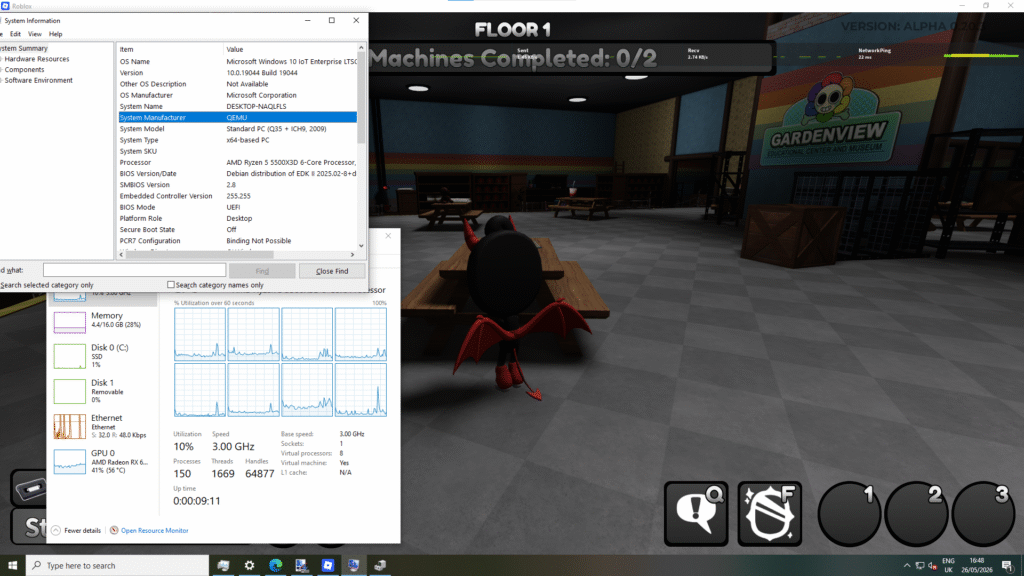
some things i would like to state though are that you do need a GPU passed through into it, it will error out if you don’t give it one, and i currently don’t understand why but now know from experience that for Roblox to run on a VM whose host runs an AMD CPU you also need to make sure to pass the ‘topoext’ feature which allows the VM to be aware of the fact that you have a processor capable of hyper-threading.

probably good practice to enable it either way though considering what it does.

edits

(2026-05-31: “it will error out if you don’t” is now “it will error out if you don’t give it one”)
(2026-05-31: replaced the phrase “QEMU hooks.d” with “libvirt hooks”)
(2026-05-31: updated images to enable enlarge on click)

the downtime

so the server was down for a little while as a result of some “maintenance” so i thought i’d write here about what actually happened during the downtime.

first, i had a look online for some storage. excluding the boot drive, the server’s been living off of a 4tb seagate barracuda that was unable to access its last ~600gb of data as fast as it could the rest of it this whole time. i thought it was time for an upgrade because i was indeed rapidly approaching that last 600gb and i wanted to be able to continue downloading youtube so i don’t have to use youtube anymore. i found a listing for some 4TB SAS drives at around £31 per drive which i feel is fairly good considering the rapidly increasing price of literally everything. next i went looking for a SAS HBA card because the microserver gen8’s built-in drive controller doesn’t support SAS drives. that led me to an LSI 9211-8i that i got for ~£33. when they arrived i cable tied a small fan to the card’s heatsink as people claimed the cards run hot and after fighting with the iLO and USB ports then giving up and flashing a livecd onto a spare SSD, i had it booted to be able to flash the card to the latest firmware that the gen8 supports. the flashing was a surprisingly easy process, backing up the current firmware went quick and putting the new firmware on was equally as quick.

next i put the drives in and booted the machine. once in i chose to set the drives up as a raid 5 array with an ext4 filesystem as i figured 12tb would be plenty for now and some extra redundancy wouldn’t hurt. now why i didn’t choose something like zfs is mostly just because of my inexperience with it and that raid and ext4 has worked perfectly fine for me in the past and still continues to so i suppose i’ve just not felt the need for anything new in that regard. after that was set up copying the existing data took around a night, i had the old hard drive plugged into my main computer to transfer the files over the network. once i woke up the downloading began. i set up tmux and yt-dlp then went mad downloading youtube channels. clearly too mad because once i had got out of vrchat that night i SSHed into the VM doing the downloading and i had been banned from accessing youtube on my home IP lol. an install of the mullvad vpn client fixed that quite quickly though and within like a minute i was back to downloading.

a few days prior to this i had been offered another microserver gen8 from a friend. at this point it had turned up and i decided to link the two together in proxmox, give the other one a cheap graphics card for transcoding and pass the server VMs to that machine, and so onto ebay i went. i found an nvidia quadro p400 for cheap and bought it. once the most powerful nvidia card i’ve personally ever bought turned up i put it into the server and booted it but once it got past the first stage of boot the display on the iLO console went black. this was because the bios was set to output its display to a discrete gpu if one was detected which is actually really reasonable. the unfortunate part about that however is that i am not reasonable. into the bios i went to disable that! once the server started i edited the boot parameters to allow pcie passthrough and then passed the GPU into the VM running the jellyfin server. installation of the drivers went smoothly and now the server doesn’t take minutes trying to transcode my breaking bad rips using software.

we should be back for good now.

a slightly early 2 years

i’ve managed to write at least one post for this site every month for 2 years, which i feel is impressive for my standards since my interest in things usually goes after about a month only to reappear months later for a similar amount of time. in a small celebration of this i’ll let you all know about some things i’m working on in the background as i did last year.

first is a post about the recent downtime the server experienced. what caused that was that i was performing some upgrades to it and said upgrades took a lot longer than i expected which despite that i simultaneously expect for these kinds of things. it’s all working great now though and the server is a lot more capable than it was. i’ll hopefully be talking more about the specifics of it some time soon.

next is something i do recall talking about in the past which is that i wish to start making write-ups on every vr headset i own. right now my collection is quite small at only two (a third turning up tomorrow) but as time goes on i’m sure that number will increase so long as my interest in vr stays which i’m pretty confident it will. said write-ups will contain the expected info like the headset’s resolution, fov, tracking quality, and comfort. in addition to that i’ll also be talking about the modifications you can do to get a bit more out of them as well as an analysis of how well the headsets run popular vr software/games on an older machine i’ll build out of my last computer once i’m done upgrading the one i’m typing this on, which i understand will likely exclude newer high res headsets but i don’t plan on focusing on those myself due to their generally high price and my interest being more towards getting the most out of older stuff as i’m sure is evident from what i talk about here. and as promised at some point i’ll get to testing steamvr performance with the 2.0 ui vs the 1.0 ui as i’m still using the old ui due to its better performance on my machine.

see you all next month.

the one for this month

what comes to my mind when i think about this month is mostly soldering and console repair so i thought since i haven’t said too much about that outside of the gamecube, dreamcast and the 3 original xboxes i’d talk about that for this month.

after doing the xboxes i naturally thought the next step would be the 360 despite the added difficulty of some very small soldering points and on the 360 S systems (my personal favourite model) having to scrape some solder mask off a via to expose a point. at first i had a look on ebay and found one with a trinity board for cheap that had a burn mark on the front panel. i thought i’d do that one cause as i’d go on to say to a friend i borderline felt sorry for the xbox but the day after i bought it i got refunded with the reason being that it was out of stock or damaged. that led me onto cash converters who were having a flash sale on another trinity that i bought instead.

i then had to have a look online for the things i’d need to try and pull off this rgh. finding smd LEDs and a craft knife etc. was easy and rather boring so we’ll skip past that and then i found a local site selling 360ace v3 chips for a really cheap price with a high quantity in stock (500+) which surprised me because apparently the xilinx xc2c128 CPLD that powers the chip is no longer being manufactured and because of that we’d run out of them at some point. i suppose they were talking about a lot further into the future than i thought this would actually occur at given the current state of the economy lol.

anyway i feel it’d be valid to ask something along the lines of “360ace? rgh1.2? why are you doing that? doesn’t the rgh3 exist?” to which my answer is that i wanted to install a viper dual nand v2 to switch between stock and rgh on the system. installing one with one of the nands flashed to the stock image on an rgh3 from what i understand would cause that stock image to red ring when you try to boot into it as the stock software doesn’t like having an rgh in place and the viper is unable to disable it like it can with the chip because what’s doing the glitching on rgh3 is the 360 itself (specifically the smc which is part of the southbridge). now why i wanted to do this when stealth servers exist is that i personally don’t trust the majority of them. (i won’t name any except for my mention of proto later on because i feel proto is cool despite these beliefs of mine, nor will i provide any proof as that’ll cause services to be named but i’ve seen) paid ones using dodgy payment gateways that have horrible ratings online, the abundance of stealth servers that provide you with easy to access cheat menus, the fact that none of them are open source especially, and not to mention petty drama between services that i believe is completely unnecessary and in my mind only serves to make me think that the operators of one of these services caught in the conflict are just one day gonna take everyone’s keyvaults and fuck off. similar things have happened before in other homebrew scenes (see this vice.com article, ctrl+f and search for “DAuther”). keeping the software closed source would make total sense if it were 2011. you have a piece of software that allows you to bypass a load of challenges that the microsoft servers will give to your system to determine if it’s modded or not. of course you wouldn’t want to make that open, they’d patch it immediately. but it’s not 2011 anymore, that was 15 years ago as of the time of writing this and it’s clear as day microsoft do not give a fuck about the 360 servers anymore. a bug in the cloud save system for 360 games has just been fixed after at least a month of game data showing up as corrupt for some users, they do not care anymore and i’m sure that if something like the completely free proto stealth server were to go open source the tricks it uses to present your system as stock to microsoft would not be patched at all.

now that i’m done ranting though let’s get to the install. i try to open the system up and manage to do it after the xbox managed to slice 2 of my fingers. i sort my fingers out, clean it up a little, get the board out, take the heatsink off with an x-clamp removal tool, and flip it over. the first thing i do is scrape the solder mask over the pll_bypass via because i figured that if i fucked that up everything else would be for nothing anyway. after maybe 10-15 minutes and this mrmario2011 tutorial i somehow have the solder mask scraped. copper’s all nice and exposed and i didn’t accidentally cut the trace below the pll point (which for those of you who don’t know would make the system unbootable until you repair it). i then solder my nand programmer to the board (god the yellow point is so fun to work with), power the board and connect the programmer to my computer to dump the nand then flash xell. after that i solder a wire to my now exposed pll point then solder a wire to everywhere else, the post and reset points at the bottom, the clk point next to the hana, and 5v and ground. that goes onto the glitch chip that i prepared by soldering a pin header to the programming points, flashing a timing file, then mounting it in the space just in front of the heatsink. i start the system and holy fuck i actually did it. i’m in xell. after that i take the cpu key and use that to make myself a 17559 glitch2 image with smc+ and the nohdmiwait patch applied. that gets flashed to the system and yeah it boots great.

next it’s time for the viper dual nand. i flip the console over, position the qsb, tape it into place temporarily and get to work. soldering those points is something that i honestly found really fun and once it was done i soldered in the 4 extra points and set the jumper on the dual nand. next is the rf board. i take the plastic led diffuser off the board and scrape a space near the light that corresponds to the third player when the system is stood up to solder the negative point of an smd led that’ll be used by the viper to tell me what nand it’s on when i tell it to switch. positive goes to an unused point on the connector that you can use for this led and after that i just take some time to be genuinely surprised at the fact i managed to do any of this. after resoldering the yellow wire from the nand programmer (we love you yellow point) and flashing the stock image back onto the stock nand and the rgh image onto the dual nand chip, it all worked great.

…or so it seemed to. later on in the day, once i was back in my bedroom and the xbox was put back together, i was configuring dashlaunch. i accidentally reinstall dashlaunch thinking for some reason it wasn’t preinstalled on the system before actually having a config it could use and even after noticing the install button’s current description said that pressing it would uninstall dashlaunch. reinstalling it for no reason seemed to go well so i rebooted and the system wouldn’t glitch. i assume i must have bricked it then and leave it be, planning to flash it again tomorrow. a few hours later i turn it back on just to see what would happen and it actually glitches fine again. i then start to set up xbdm so i could replace the bootanim.xbe file stored in the nand with the old 360 boot animation and after rebooting it wouldn’t glitch again. this leads me to believe the timing i flashed wasn’t as consistent as i first thought it was which ends up being correct. after flashing the right timing file for that system it works great. most of the month later after plenty of use it still works great. i’m happy to be able to say i own an RGHed 360 now because i remember absolutely ages ago trying to load xexmenu on my old stock 360 E thinking it’d just work lol, now i actually get to see it work. even more happy that i actually managed to do it myself really.

edits

(2026-03-01: i realised i didn’t explain the purpose of the smd led so i’ve added a sentence to do that)

santa’s little xbox

so that xbox from yesterday. yeah i seemed to be right about it not really being fucked as much as it was trying to boot from a source that had nothing to give it. i opened it back up today and one of the wires were magically disconnected from the LPC. so i took all those wires out and done a better job soldering it and who would have guessed, it boots now. since the issue with that one originally was the hard drive, i used the chip to lock the drive in there to that xbox’s key and it loaded the microsoft dashboard once i told the chip to just boot from the tsop. a fairly old dashboard it would seem, one without the xbox live option. i suppose expected since it is a 1.0. at first i thought there would be nothing on the drive and then i took a look at the savegames and noticed an xbmc save. that convinced me to boot it back up into the modchip’s menu to get an FTP server going so i done that and connected to it and did notice the old owner’s xbmc, avalaunch and unleashx installs among trainers and a dvd player software and a few other utilities. i then FTPed over the xcat launcher and cerbios, booted into cerbios to then open xcat and that found just under 2100 files of interest and uploaded 434 of them. i do wonder what happened to that xbox in its past life.

how has 2025 (almost) ended already

this month i’ve spent learning how to solder shit finally. so far it’s been an enjoyable process and i haven’t irreversibly broken any of my consoles (i say, sitting next to an original xbox that i’ve given the “christmas lights” frag error to, we’ll fix that soon i’m sure…) so why don’t i let you lot know what i’ve worked on so far.

first thing i done (after practicing of course) was my dreamcast. it just needed a replacement clock battery. soon i might do the resettable fuse mod but i’m not too concerned about that. it was easy enough to take out the old ML2032 and replace it with a vertical coin cell holder. clipping off the leg of the resistor next to it and soldering in the diode went well too. i popped in the new CR2032 and this is where the fun starts. so i plug it in, turn it on, and nothing happens at all. after loads of troubleshooting i give up and assume i’ve somehow broken my dreamcast while attempting to replace the clock battery. hours later i make a realisation though and go back to my work area to get the cable i was using to try and power the dreamcast. once i see the plug my realisation is confirmed. my smart ass used a cable that had no fuse in the plug. i put one in and who would have guessed that the dreamcast works fine now that i’m using a plug with a fuse in it. i take it upstairs and it does indeed remember the time now.

next was my gamecube. i take that apart, replace the power led with a green one, install a coin cell holder in place of its clock battery and tear it down to the motherboard to solder in a pi pico for picoboot. as the guide states it is one of the easier soldering jobs you can take on but it is still one that takes time, as soldering does indeed tend to do. it’s nice to have some form of magnifier to help line up and solder in the cables to the board too i found. once everything was soldered in and i was sure that it all looked good i put it back together and turned it on. this time it actually came on but it booted to the gamecube’s ipl for some reason and not gekkoboot (which would then load the first ipl.dol it sees, in my case swiss). i try flashing the pi pico again (fun tip, don’t do this with the pico’s power still connected to the gamecube. it will try to power whatever the pico’s soldered into and it was very weird seeing my gamecube to hdmi adapter’s power light coming on when i plugged the pico into the computer. it didn’t harm anything in my case but still it’s best to be on the safe side with these things as i understand it.) and that doesn’t change anything. and then i realise i’ve forgotten about their golden rule for the wire length. they can’t be any more than 10-12 cm long. the way i was trying to mount the pico meant that the wires were way over that so after referencing this video from macho nacho on the topic i mount the pico somewhere reasonable and the gamecube does indeed boot into swiss. a few days later once the parts arrive i bring the gamecube back in to install a set of green leds to the controller ports. i set up each led by clipping the leads, attaching a resistor to the positive end of each lead, adding wires to each lead, then using heatshrink on anything that needed it. i was having trouble putting the top shell back on and at that point i reference this video from MVG to realise that i put on way too much heatshrink. so i manage to get off the excess and hot glue the leds in place like he does in the video and now my gamecube looks very green and i love it.

now the xbox. and by the xbox i mean the xboxes. i bought three of them in various condition for not that much more than the price of one working one (around £70). so far i’ve removed the clock capacitors on each board and today i brought in the most fucked of the three (a what seems to be 1.0 that’s absolutely had someone in it and displays many a hard drive error on bootup) in hopes of installing a pi pico in there to use as a modxo chip. i took my time installing each wire to the points on the LPC and D0 and then didn’t take as much time installing the wires to the pico, something i regret but not necessarily because i think i’ve broken the xbox (since i right now don’t think that’s the case), more because i realise that if i want to keep doing this i really should learn how to manage time and stress better. anyway i put it back together and as stated in the first paragraph it’s now showing me that it can make christmas lights. from researching what that error is i believe what’s happening is that D0 is being sent to ground which is telling it to look for a bios off the LPC bus but it’s not able to get any bios image off the pico when searching for one there and so it gives that error. if that golden rule from installing the picoboot is just a general rule of thumb/it’s just a good idea to keep cables as short as possible then it may just be that we’re looking at another case of cable too long. i shall keep you updated.

merry late christmas to those who celebrate and happy new year :D

just buy a steam deck

that is not purchasing advice. it is a thing i’ve done however. so for context i was looking for a handheld, one considerably more capable than a switch, now that x86/64 handhelds exist it would be nice if said handheld was one of those since the vast majority of my games are built to run on that architecture, preferably not windows though, and preferably not as thick as a brick. i didn’t need one that was too powerful, just good enough to run what i want to run at actually playable framerates, i wasn’t looking for an amazing oled high refresh rate screen because i’m perfectly fine with using 60hz lcd displays outside of vr, and having a low amount of storage would be fine cause x86/64 machines tend to be fairly known for their upgradability. i did look at other handhelds before deciding on the deck but between their high price, high amounts of power and high spec screens that just don’t make sense for my use case, and as said earlier the thickness that they tend to have (and the weight that tends to come with it) that base model one sounds good to me.

so it arrived fairly quickly after a delivery guy turned up claiming to be from the courier that was delivering it only for them to disappear and for another dude who actually was from said courier to turn up. thinking that was an absolutely outstanding experience, i get it off the dude who actually had it and plugged it in to get it out of the battery storage mode it gets shipped to you in. i turn it on, let it update and log into my steam account, and then go into the desktop mode and use it to flash a bazzite image to a usb that i then installed over steamos.

my reasoning for using bazzite as opposed to steamos for the most part are just a few smaller things that for me add up. bazzite supports hard drive encryption, so by using my phone as a usb keyboard emulator i can keep it encrypted using a very long and very secure password which makes sense to me since it is a portable device that often sees reports of it being stolen. it won’t stop anyone from just overwriting the drive with another os of course but it will stop them from accessing my data and that’s what i’m worried most about. they claim to ship the newest software available, unlike their claim that steamos only sees bi-annually updates to system packages. they allow you the choice between kde and gnome which i like because i feel gnome works better on portable devices. you could certainly argue that steamos isn’t really the os for me. it certainly isn’t targeted towards people like me and that’s a good thing.

now, the hardware itself. plenty of people now have made the comparison between it and the wii u gamepad and since i have my 5th wii u on the way i thought i’d also mention the similarities between it and the wii u gamepad. the sticks being at the top of the system feels as nice as it does on the gamepad (although i must admit i don’t use them much, i’ll talk about that in a second), it feels as good in the hand as the gamepad does too. naturally it’s a bit heavier than the gamepad but it’s not uncomfortably heavy, whenever i need to hold the device in one hand for a second to grab a drink or something i’m perfectly able to. the trackpads are amazing. absolutely fucking amazing. they’ve completely replaced the sticks for me and i can’t wait for the new steam controller to come out because of them. they’re incredibly customisable just like the rest of the device’s controls, a lot more comfortable to me than a stick is because it’s naturally a lot closer to being flush with the case, and they can make navigating the os so much nicer than if they weren’t there in certain cases like using a mouse in desktop mode or text entry with the on screen keyboard.

performance? pretty good. at least for what i do with it. mostly a lot of indie and older games, really quite easy to run stuff. the resolution of the screen (that being 1280×800) i’m sure helps with performance too while at least to my eyes still looking really good. the very little amount of emulation i’ve done on the device seems to be really smooth too, gta 3 on pcsx2 runs stable at the 50 fps it should be at for the pal release of the game. it’s certainly not the best at running modern intensive games but if you’re like me and only do lighter stuff it’s great for that.

having access to a desktop mode i’ve found is a really helpful thing too since it allows you to run just about anything the average gaming machine running linux can. desktop software can be added to the big picture mode and steam does let you run multiple pieces of software in big picture at the same time so you’re able to do things like listen to music or a video while playing. in general the freedom of both the hardware and the software i feel is a big thing. it’s been talked about a lot but that’s because it really does matter. you’re free to install mods on your games, you’re free to upgrade the storage or swap the battery on the thing yourself, if the screen breaks you can take it as an opportunity to install a shell swap if you’ve been wanting something that looks a bit more colourful. if you didn’t buy a model with the anti-glare screen and you want that screen you can just buy one off the same people valve get them off through ifixit and install it yourself. if you don’t like linux you can install windows. if you have a death wish you can get macos running on the thing. if you like linux too much you can put gentoo on it. and that level of freedom is something that a lot of handheld devices have been missing, and something that shouldn’t be missing really since we paid for the things we’re holding.

boo

this month in my life is much like the past couple have been. not really a big thing to report on but a few smaller things that i’ve been doing.

first is the vr page. for the most part the page states its purpose but to explain it in here it’s preparation for some very future things i want to do on this site. i wish to host pages on this site filled with information i’ve collected over my time in vr because i quite like having free and easy access to information. the first page to go up will likely be one i’ve drafted about the lighthouse. at this moment in time it includes information about the 4 different retail revisions of the device that i am aware of and ways to access its built in serial console. i’m hoping the page will go up soon but really who knows lol.

next is my search for an ipod. i wanted one. part because of dankpods, part because embedded devices interest me a lot, part because rockbox interests me a lot, part because i’ve started buying music off of itunes due to its low price and drm-free downloads. it was easy to find one but god are the prices kinda mad. while looking for one i came across these two guides that really helped me understand what each ipod could do, what to look out for when buying one and where to get replacement parts for them. after researching for a while, i decided on a 30GB ipod video (5th gen) i found for ~£60. it was a bit beat up and had a broken screen and in classic ebay fashion now that i have it i’ve found a much better deal than the one i actually went with but i didn’t mind because in the future i plan to flash mod it and swap the shell anyway so paying a little more for a new screen wasn’t too much an issue. naturally with itunes installed on my computer, setup was really easy. i plugged it in, itunes asked to install a system service, it reboots, it lets me sync my music. what surprised me the most was how easy it was to install rockbox. just run the utility, add a theme in if you want, press install and reboot the ipod. i wasn’t aware it was that simple.

while looking for a dock for the ipod, i came across the sony tdm-ip10. it looked quite nice to me but one thing that i noticed while looking at pictures on an ebay listing for it is that it uses this weird proprietary port that kinda looks like the 30-pin dock connector that i’ve never seen in my life. of course with it being a completely proprietary thing i’ve never heard of i immediately gained an interest in it. turns out the port is called digital media port/dmport. according to wikipedia sony started using it in 2007 as a way to add extra functionality to their a/v equipment through selling devices like docks and wireless or bluetooth receivers that supported the interface. that got me interested in a device that supported it. i had the idea of getting like a stereo in the back of my head either way so why not have a look i suppose. a system that came up a lot when searching for dmport compatible a/v equipment was the cmt/hcd-hx80r “micro hi-fi component system”. it supports cd, all different kinds of radio, the dmport of course, aux in and usb as ways to play audio from it. (and now while writing this post i’ve been made aware of a version of it called the hx90btr that includes bluetooth support. good thing i don’t need that.) sounded good to me and you can find them all over the place where i am for really decent seeming prices, so i bought one for ~£60 and the tdm-ip10 for ~£14. it all arrived not long after and i’m really happy myself with the way that it works and the fact that the dock works fine in rockbox too, which i heard can sometimes be an issue with ipods running rockbox. i’ll have a bit of a deeper talk about it in the future i feel.

thanks for reading, happy halloween if you celebrate it lol :D

edits

(2025-11-01: made the text at the bottom of the page smaller, figured out how i done that last year again finally lol)
(2025-11-01: formatted edit text to follow the same style as the rest of the edited posts)

9 minutes in poppy street

(i promise i’ll edit this to be a direct link to the mp4 instead soon)

so this month’s been a lot of vr. lighthouse 2.0 finally, my full body tracking is back, and i get to add more to my steamvr ecosystem experience, both the hardware and the software.

so, lighthouse 2 first. it was easy to replace the base stations themselves and i used the cables that came with the new ones instead of the existing ones because the amount of vive base station power plugs that have magically broken earth prongs is actually insane. (i have 2 of them myself!) i’d later thank myself for this when i rearranged the cables in my room and realised that the new ones are a lot longer. updating was a funny thing. for some reason versions of steamvr that are any newer than 1 year (some claim 2 but i bought my index controllers in late 2024 and they could update fine so not in my experience at least) are completely unable to update hardware. you press the update button, it says it’s closing applications, it closes itself and dies. you could downgrade steamvr using the betas tab at the time to get past that issue so i did (if you’re attempting this now though, you’ll soon realise valve have removed every option from there except from beta and previous. try going through these steps instead). the first one updated fine, as for the second one i think the link box was too far away because the update failed. the update dialog told me to power cycle the base station and so i did while thinking to myself that surely powering off a device that’s updating is dangerous. either way it updated fine after that.

with these new lighthouses i’m going to try power managing them in another way. i used to keep my old lighthouse 1s on all the time as many people have suggested over the years and i ended up with 2 of them failing on me. the power indicator would stay green but it would be clear that it’s not tracking, either through a load of tracking errors or steamvr just telling me that they couldn’t see each other. now instead i’ll be turning them on with the lighthouse power management app on android a few minutes before i go into vr and putting them to sleep mode at the same time that i go to sleep. i will update if/when one of them die.

now, the full body tracking. the 3.0 vive trackers went back on sale and so i bought 2 more of those. while setting them up i decided to take the watchman dongle i already had in my computer and put it into a usb 2 port, then plugged the new ones into my front panel usb 2.0 ports. somehow this fixed an issue i had when i was using my old original vive as a watchman where i’d have to reboot windows (sometimes multiple times) to get all the devices to show up. dunno why that fixed it but i’m not complaining. use usb 2 for your watchmans i suppose. the vive trackers seem a lot more capable of calibrating well and keeping that calibration too so i’m happy with that purchase.

and of course, as is expected at some point for anyone who opts into the steamvr hardware ecosystem, valve index component failure. for a lot of people the index controllers are the only good vr controllers we have and i do agree with the fact that they are so amazing (they’re the most comfortable controllers i’ve held) but god do they love randomly dying for no reason. i was laying down in vrchat the other night and suddenly i notice my thumb presence acting up. i open the controller tester and the thumbstick presence sensor is detecting touches that aren’t happening. at some point it just stops functioning and so i restart steamvr and that fixes it for a while. next day though and the thumbstick presence no longer functions. as well as that i’ve noticed that vibrations are now louder on my left controller than my right. thankfully though so far that’s all it is. i’m not gonna bother messaging steam support unless something worse happens to them.

edits

(2025-10-07: i wrote “an” instead of “a” somewhere, well done me)

an update for august

a lot of things have happened this month that i wanted to talk about so for a short while please humour me as i go back to this format of posts.

from late july to early this month i was at a friend’s house for a week. we were a group of three for the majority of the week and i spent a lot of my time there just enjoying being with that group in person for the first time in years. we went looking for used game deals, i ended up with a sizable increase to my PS4 collection and a used PS5 in existent condition that i’m going to try to make look nicer later on. i plan on using it to get back into buying games used, with some help from an amazing website known as “DoesItPlay?“. unfortunately its firmware wasn’t old enough to be exploitable (which was of course unsurprising), hence why i’m not making a full post on it. i will however talk about my first impressions. in terms of design, i prefer the interface of the PS4 but in terms of usability i do prefer how fast and easy to navigate the PS5 is in comparison. the controller i have mixed feelings about. i love the adaptive triggers loads and feel they add to immersion a lot more than i first thought they would honestly but my hands find the DualShock 4 more comfortable and as a result i find myself picking that up over the DualSense whenever i’m able to use that instead. as for the other things that happened, a lot of music listening, gaming, i repasted my mate’s ps3 (it runs a lot better now) and i walked around aimlessly for a while and found these really nice looking gardens.

not long after i got back home, i found a cheap 1080p monitor on eBay that i bought because i had been wanting a third monitor for quite a while now. it turned up and yeah, my god is a third monitor a really helpful thing to have for the way i use a computer (a lot of multitasking, believe it or not). speaking of multiple screens too, VR. VRChat has decided it’s time to take over my soul yet again and so i’m back in there now. the group that gave me access to age restricted instances back when they were in private beta decided to start actually doing age restricted instances again some time between my absence and now and so that’s where i’ve spent a lot of my time in VRC (along with a couple friends too, of course). upon entering one of these instances, you immediately notice something. something off. in a good way. you’re in a public that’s actually civil! from my experience in the ones i spend my time in, issues are very rarely caused by anyone and when they are moderators take care of them while still giving the people causing issues a chance to stop being a cunt and stay in the instance. my return (along with the third monitor) has gotten me back into avatar stuff a little. i’m working on a different approach to getting the Nia avatar to work on mobile. it’s looking good so far, and said approach means that i don’t have to decimate the model to make it fit within the mobile performance limits. it does mean however that its performance rank won’t be as good as originally promised which is unfortunate cause that was the main reason for making the avatar mobile compatible in the first place. i underestimated the difficulty of making it a good performance rank while keeping it looking and working well. maybe in the future if i get better at this stuff i can optimise it a bit more.

i decided to charge the MacBook while rendering video too. that was a bad idea apparently. i saw a flash at some point during the process that i for some reason just thought was like a notification on my phone. i look at the Mac a few seconds later and notice it’s not charging. i mess about with the charger a little and that doesn’t get it to charge again so i decide to replace the fuse in the plug as a troubleshooting step. i plug it back in and there’s that flash again! there’s your reminder to not use fake chargers i suppose. i tried buying a new charger (an official one this time) and the Mac blew the fuse on that one too, so i bought a new MagSafe port board and turns out that’s the wrong one and the right one for the model i have is like £40. don’t know what i’m gonna do about that one really cause i fear that the issue is gonna be something deeper than the MagSafe port anyway. it kinda just ruined my want to use that Mac and increased my want to buy things that are more repairable going forward if i’m being honest. my final thought on this situation is that this video cost me one 2015 MacBook Pro to make and so you should watch it or something. and while you do that i’ll look at buying a Framework and do nothing more than look for a good while now because of that price and because i want an upgrade to my desktop first. (or do i? it’s Haswell. it doesn’t get much better than that really.)